🚀 Introduction
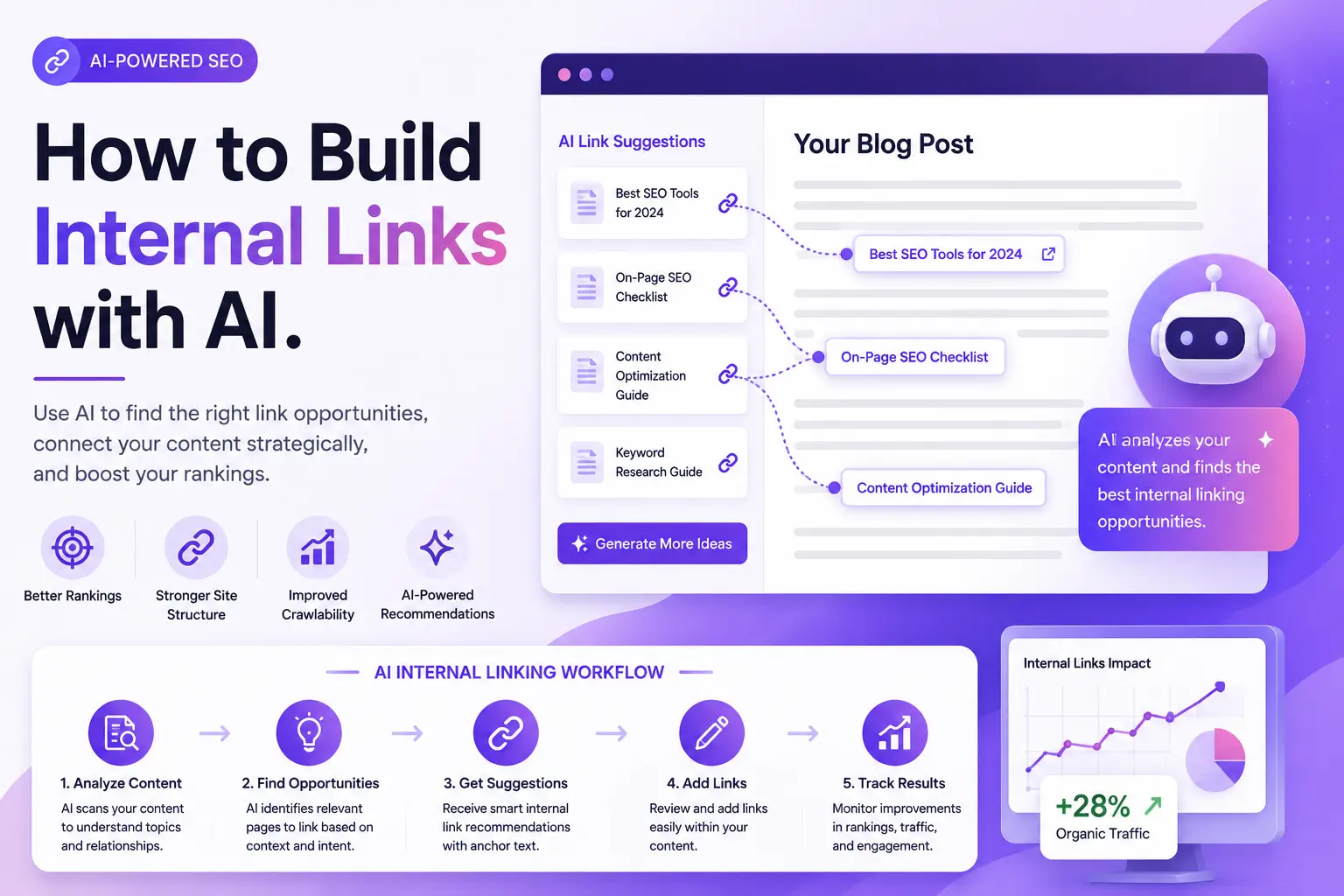
To build internal links with AI, export your site URLs, group related pages into topical clusters, select a pillar page for each cluster, ask AI to find contextual link opportunities, generate natural anchor text, review every suggestion, and monitor orphan pages, crawl depth, rankings, and conversions after implementation.
AI makes internal linking faster because it can analyze relationships across hundreds or thousands of pages.
However, speed is not the main benefit.
The real advantage is moving from keyword-only matching to links based on:
- Page meaning.
- Search intent.
- Entities.
- Topic relationships.
- User journeys.
- Page importance.
- Existing site architecture.
- Business priorities.
A weak internal linking workflow searches for one keyword and inserts links wherever that phrase appears.
A stronger AI-assisted workflow asks:
- Are these pages genuinely related?
- Would the destination answer the reader’s next question?
- Is this the most important page for the topic?
- Does the anchor accurately describe the destination?
- Does the link strengthen a useful topical cluster?
- Is the target page already receiving enough internal links?
- Is the source page strong enough to warrant meaningful attention?
- Could the link create keyword cannibalization?
AI can help answer these questions at scale.
It should not make every final decision automatically.
This guide explains how to build internal links with AI safely, from the first site export to ongoing automation and performance monitoring.
⚡ Quick Verdict
The safest way to build internal links with AI is to use AI for discovery, clustering, prioritization, and anchor suggestions while keeping humans responsible for final relevance and placement.
Start with a sitemap or URL export, organize pages into topic clusters, assign pillar and supporting pages, find orphaned content, generate contextual suggestions, review the anchors, deploy in small batches, and measure the results.
| Stage | Best Use of AI | Human Responsibility |
|---|---|---|
| Site inventory | Process titles, URLs, and page data | Remove outdated or irrelevant pages |
| Topic clustering | Group semantically related content | Confirm the groups match real search intent |
| Pillar selection | Score likely authority pages | Choose pages based on business strategy |
| Link discovery | Find relevant source-target pairs | Reject weak or unnecessary connections |
| Anchor text | Generate natural variations | Confirm accuracy and readability |
| Automation | Apply approved rules at scale | Set limits, exclusions, and safeguards |
| Auditing | Find orphaned and underlinked pages | Decide whether each page deserves links |
| Measurement | Summarize changes and trends | Connect SEO metrics to real outcomes |
Best Approach by Website Size
| Website Size | Recommended AI Workflow |
|---|---|
| Fewer than 50 pages | AI prompt plus manual implementation |
| 50–300 pages | Spreadsheet, sitemap, AI clustering, and a WordPress linking tool |
| 300–2,000 pages | Semantic crawler, Search Console data, and controlled bulk approval |
| More than 2,000 pages | Graph-based analysis, automation rules, staged deployment, and technical monitoring |
| Multiple websites | SaaS crawler or agency platform with shared reporting |
The clearest takeaway is this: AI should reduce the time required to find the right links—not remove editorial judgment from the process.
📚 Recommended Reads
- Best AI Tools Tested for Internal Linking.
- Link Whisper Review: Is This Internal Linking Tool Worth It?
- Best AI SEO Tools Tested This Year: Practical Tools for Better Rankings, Content Quality, and AI Visibility
- NeuronWriter Review: Is This Budget-Friendly SEO Content Optimizer Worth It?
- Semrush Alternatives: Best SEO Tools by Use Case This Year
📌 In This Guide
1. 🧠 How AI Changes Internal Linking
2. 🧬 Keywords vs Entities and Context
3. 🗂️ Prepare Your Website Data
4. 🧱 Build Topic Clusters with AI
5. 🏛️ Choose Pillar and Supporting Pages
6. 🔍 Find Internal Link Opportunities
7. ⚓ Generate Natural Anchor Text
8. 🔗 Build a Hub-and-Cluster Structure
9. 👻 Find and Fix Orphan Pages
10. 🤖 Use AI Internal Linking Tools
11. 💬 Use ChatGPT or Gemini with Your Sitemap
12. 🧰 Internal Linking Prompts You Can Copy
13. ⚙️ Automate Internal Links Safely
14. 📊 Prioritize Links with Search Console Data
15. 🌐 Internal Links for GEO and AI Search
16. ⚡ Technical and Performance Checks
17. 📈 Measure Internal Linking Results
18. ⚠️ Common AI Internal Linking Mistakes
19. ❓ FAQ
20. 🏁 Final Internal Linking Workflow
21. 📚 Recommended Next Reads
🧠 How AI Changes Internal Linking
AI improves internal linking by analyzing relationships between pages more quickly than manual keyword searches. It can cluster pages by meaning, identify weakly connected topics, suggest source-target pairs, generate anchor text, and prioritize pages using traffic, impressions, rankings, and existing link data.
Traditional internal linking often depends on:
- Searching WordPress manually.
- Running Google
site:searches. - Looking for exact keyword matches.
- Remembering previously published posts.
- Updating links only when a new article is published.
- Auditing orphan pages occasionally.
- Using identical anchors repeatedly.
This approach becomes difficult as the website grows.
A writer managing 30 articles may remember the most relevant connections.
A publisher managing 3,000 pages cannot.
What AI Can Analyze
AI can process:
- Page titles.
- URLs.
- Meta descriptions.
- Headings.
- Body text.
- Categories.
- Existing links.
- Search Console data.
- Target keywords.
- Content types.
- Publication dates.
- Conversion goals.
It can then recommend relationships that may not share the same exact wording.
For example:
- “Google Business Profile optimization”
- “Google Maps rankings”
- “local pack visibility”
- “local business categories”
May belong to the same topical system even when the phrases differ.
What AI Cannot Know Automatically?
AI usually does not know:
- Which page generates the most revenue?
- Which article is outdated?
- Which page is the business plan to be removed from?
- Which target has the best conversion rate?
- Whether two similar pages are cannibalizing each other.
- Which information is legally sensitive?
- Which link feels unnecessary to a real reader?
- Whether a client has a specific campaign priority.
That is why AI should support strategy rather than replace it.
🧬 Keywords vs Entities and Context
Keyword-based internal linking connects pages when they contain matching words. Entity- and context-based linking looks at what the pages mean, how the concepts relate, and whether the destination helps the reader understand the subject more deeply.
Keyword-Only Example
Suppose an article contains the phrase:
AI content writer
A basic auto-linker may connect every use of that phrase to one product review.
That can become problematic when:
- The sentence refers to AI writers generally.
- Another comparison page would be more helpful.
- The phrase appears several times.
- The destination does not match the current context.
- The same anchor is repeated across the site.
Context-Based Example
Consider this sentence:
SEO teams should review AI-generated drafts before publishing them to protect factual accuracy and brand tone.
Possible destinations include:
- A guide about editing AI content.
- A review of a Brand Voice platform.
- An article about helpful content.
- A workflow for fact-checking.
- A guide about AI SEO writing.
The correct destination depends on the surrounding paragraph and the reader’s likely next question.
What Is an Entity?
An entity is a clearly identifiable concept, person, product, organization, place, event, or subject.
Examples include:
- Google Search Console
- WordPress
- ChatGPT
- Google Business Profile
- Semrush
- internal linking
- topical authority
- local SEO
Entities help AI systems understand that different phrases may refer to the same subject or related concepts.
Why Context Matters More Than Matching
A useful internal link should satisfy three forms of relevance:
| Relevance Type | Question |
|---|---|
| Topical relevance | Are the pages about related subjects? |
| Contextual relevance | Does the destination fit this exact sentence or paragraph? |
| Journey relevance | Is this a logical next step for the reader? |
All three should be considered before adding a link.
🗂️ Prepare Your Website Data
Before asking AI to build links, create a clean inventory of the pages that are eligible to receive and provide internal links.
Export the Following Fields
A useful spreadsheet can include:
| Field | Why It Matters |
|---|---|
| URL | Identifies the destination |
| Page title | Gives AI a basic topic signal |
| Meta description | Adds context |
| Primary keyword | Helps identify intent |
| Content category | Supports clustering |
| Page type | Separates guides, reviews, categories, and money pages |
| Existing inbound links | Shows underlinked pages |
| Existing outbound links | Shows link-heavy pages |
| Impressions | Indicates search visibility |
| Clicks | Shows actual organic demand |
| Average position | Helps identify near-ranking pages |
| Conversions | Reveals business importance |
| Status | Active, outdated, redirect, merge, or delete |
Where to Get the Data
Depending on the website, data may come from:
- An XML sitemap.
- WordPress exports.
- Google Search Console.
- Screaming Frog.
- Semrush.
- Ahrefs.
- Sitebulb.
- An internal linking plugin.
- A CMS database export.
- A manually maintained content inventory.
Clean the Inventory First
Remove or flag:
- Redirecting URLs.
- Duplicate pages.
- Tag archives.
- Thin pages.
- Expired offers.
- Test pages.
- Paginated URLs.
- Noindex pages.
- Canonicalized duplicates.
- Content scheduled for deletion.
AI cannot create a healthy architecture from a poor page inventory.
Minimum Dataset for a Small Site
At minimum, provide:
- URL.
- Title.
- Summary.
- Target keyword.
- Content type.
That is enough to begin basic clustering.
🧱 Build Topic Clusters with AI
AI can organize a large content inventory into topic clusters, identify ungrouped pages, and suggest missing relationships. The clusters should then be reviewed to ensure that pages share a real audience, search intent, and subject—not merely similar vocabulary.
What Is a Topic Cluster?
A topic cluster is a group of related pages organized around a broader central subject.
A basic cluster includes:
- One main pillar page.
- Several supporting pages.
- Links from supporting pages to the pillar.
- Links from the pillar to useful supporting pages.
- Contextual links between supporting pages where relevant.
Example AI SEO Cluster
Pillar page:
Best AI SEO Tools
Supporting pages:
- Best AI Visibility Tools
- Best AI Tools for Internal Linking
- Best AI Keyword Research Tools
- Best AI Content Optimization Tools
- How to Optimize for AI Search
- What Is AI Search Visibility?
- AI SEO Tools for Bloggers
- AI SEO Tools for Agencies
Prompt for Clustering a Site
Use this prompt after pasting a clean URL list:
Act as a senior SEO information architect. Analyze the following website pages and organize them into topical clusters based on semantic meaning, search intent, audience, and user journey.
For each cluster:
- Name the main topic.
- Select the best existing pillar page.
- List the supporting pages.
- Flag pages that do not fit.
- Identify duplicate or overlapping intent.
- Suggest missing supporting content.
- Explain why each page belongs in the cluster.
Do not group pages only because they share one keyword.
Review the Clusters Manually
Reject a grouping when:
- The audience differs.
- The search intent differs.
- One page is transactional, and another is unrelated informational content.
- The concepts overlap only superficially.
- The pages compete for the same keyword.
- The group would confuse readers.
- A different pillar page is strategically more important.
Cluster Spreadsheet Structure
| Cluster | Pillar Page | Supporting Page | Relationship | Priority |
|---|---|---|---|---|
| AI SEO tools | Best AI SEO Tools | AI tools for internal linking | Specialist subcategory | High |
| AI SEO tools | Best AI SEO Tools | AI visibility tools | Specialist subcategory | High |
| Internal linking | Internal linking guide | Link Whisper review | Tool review | Medium |
| Internal linking | Internal linking guide | Best AI tools for internal linking | Tool comparison | High |
This table becomes the foundation of the link plan.
🏛️ Choose Pillar and Supporting Pages
AI can recommend a pillar page based on topic breadth, but the final decision should also consider page quality, authority, search performance, conversion value, and whether the page genuinely provides the best overview of the subject.
What Makes a Good Pillar Page?
A pillar page should:
- Cover the broad topic.
- Serve a broad search intent.
- Link naturally to deeper subtopics.
- Remain useful over time.
- Be updated regularly.
- Have strong content quality.
- Receive meaningful internal links.
- Support an important business or editorial goal.
Weak Pillar Selection
Do not choose a page as the pillar only because:
- It was published first.
- It has the shortest URL.
- It uses the broadest keyword.
- It already has the most links.
- AI selected it without performance data.
AI Pillar Scoring Prompt
Score each page from 1 to 10 for suitability as a pillar page using:
- Topic breadth
- Search intent coverage
- Content depth
- Current organic visibility
- Business importance
- Ability to link to supporting pages
- Risk of keyword cannibalization
Recommend one primary pillar page and explain the decision. Do not select a page only because its title contains the broadest keyword.
Pillar vs Supporting Page
| Pillar Page | Supporting Page |
|---|---|
| Broad topic | Narrow question or use case |
| Introduces the subject | Explores one part deeply |
| Links to many subtopics | Links back to the pillar |
| Usually evergreen | May be tactical or time-sensitive |
| Central cluster role | Specialist cluster role |
🔍 Find Internal Link Opportunities
AI can find internal link opportunities by comparing the meaning of a source page with the topics, intent, and value of possible target pages. The best suggestions identify an existing sentence where the link improves understanding instead of forcing a new keyword into the copy.
Three Types of Opportunities
1. Links from New Content to Existing Pages
When publishing a new article, add links to:
- The pillar page.
- Supporting definitions.
- Relevant tool reviews.
- Deeper tutorials.
- Related comparisons.
- Evidence or case studies.
- Conversion pages when appropriate.
2. Links from Existing Pages to New Content
This is often more valuable because older pages may already have:
- Backlinks.
- Organic traffic.
- Authority.
- Search visibility.
- Stable indexing.
AI can scan old content and locate paragraphs related to the new page.
3. Links Between Existing Pages
A sitewide audit may reveal:
- Missing cluster links.
- Underlinked commercial pages.
- Weak pillar connections.
- Orphaned articles.
- Outdated destination URLs.
- Redirected internal links.
- Repetitive anchors.
Source-Target Matching Prompt
Review the source article and the list of eligible destination pages. Suggest only internal links that:
- Match the paragraph’s real context.
- Help the reader continue logically.
- Point to the most authoritative eligible destination.
- Do not duplicate an existing nearby link.
- Do not create keyword cannibalization.
For each suggestion, provide:
- Source sentence.
- Destination URL.
- Recommended anchor text.
- Reason for the link.
- Confidence score from 1 to 10.
Exclude suggestions below 8 unless no stronger option exists.
Link Opportunity Table
| Source Page | Source Section | Target Page | Suggested Anchor | Reason |
|---|---|---|---|---|
| AI internal linking tools | Link Whisper section | Link Whisper review | Link Whisper review | The reader may need a detailed evaluation |
| AI SEO tools | Internal linking section | AI internal linking tools | AI tools for internal linking | Provides a deeper tool comparison |
| Internal linking guide | Automation section | Internal Link Juicer review | rule-based internal linking | Explains a specific implementation method |
⚓ Generate Natural Anchor Text
AI can generate descriptive anchor text variations based on the destination page and source sentence. The best anchor is concise, natural, relevant to both pages, and clear enough that the reader can predict what will appear after clicking.
Good Anchor Text Should Be
- Descriptive.
- Concise.
- Contextual.
- Grammatically natural.
- Accurate.
- Varied across the website.
- Useful without SEO knowledge.
Weak Anchor Examples
- click here
- read more
- this article
- learn more
- website
- source
These anchors provide little context.
Over-Optimized Examples
- best AI internal linking tools
- best AI internal linking tools
- best AI internal linking tools
Repeating the same exact-match anchor across many pages can make the architecture feel artificial.
Better Variations
For a page targeting the best AI internal linking tools, use context-appropriate variants such as:
- AI internal linking tools
- Tools for automating internal links
- internal linking software
- semantic link suggestion tools
- WordPress internal linking tools
- AI-powered link recommendations
Anchor Text Prompt
Generate five natural anchor text options for the destination page below.
Requirements:
- Use the source sentence’s grammar.
- Avoid generic anchors such as “click here.”
- Avoid repeating the exact primary keyword unnecessarily.
- Keep the anchor concise.
- Accurately describe the destination.
- Include one partial-match, one semantic, and one entity-based option.
Source sentence: [insert sentence]
Destination title: [insert title]
Destination summary: [insert summary]
Anchor Review Checklist
Before approving an anchor, ask:
- Does it describe the destination accurately?
- Does the sentence still sound natural?
- Is the same anchor overused elsewhere?
- Is it too long?
- Does it promise something the page does not provide?
- Would a reader understand why it is linked?
- Is another destination more relevant?
🔗 Build a Hub-and-Cluster Structure
A hub-and-cluster structure links supporting pages to a central pillar, links the pillar back to useful supporting content, and adds lateral links only when two supporting pages share a genuine contextual relationship.
Basic Link Direction
Supporting Pages → Pillar Page
Every supporting article should usually include a natural link to the broader pillar.
This helps:
- Clarify the cluster.
- Reinforce the pillar’s importance.
- Give readers a broader overview.
- Connect specialist content to the central topic.
Pillar Page → Supporting Pages
The pillar should direct readers to:
- Detailed guides.
- Tool reviews.
- Comparisons.
- Examples.
- Use cases.
- Technical explanations.
Supporting Page → Supporting Page
Add lateral links only when the connection helps the reader.
For example:
- A guide about finding orphan pages may link to a guide about internal link audits.
- A Link Whisper review may link to a comparison of internal linking tools.
- A topic cluster guide may link to a semantic SEO guide.
Do not force every spoke to link to every other spoke.
Hub-and-Cluster Prompt
Design a hub-and-cluster internal linking structure for the following pages.
Rules:
- Every supporting page should link to the pillar naturally.
- The pillar should link to the most useful supporting pages.
- Add lateral spoke-to-spoke links only when the reader journey is clear.
- Avoid circular linking with no user value.
- Avoid linking multiple pages that target the same intent.
- Suggest descriptive anchor text.
Return the plan as a table with source page, target page, anchor, placement context, and purpose.
Cluster Diagram Example
Pillar: Internal Linking for SEO
Links to:
- How to Build Internal Links with AI
- Best AI Tools for Internal Linking
- Link Whisper Review
- How to Find Orphan Pages
- Internal Linking Audit Guide
- Anchor Text Best Practices
Each supporting page links back to the pillar.
Relevant supporting pages link to one another when the transition is natural.
👻 Find and Fix Orphan Pages
AI can help identify orphan pages by comparing a crawl or link report with the sitemap. However, an orphan page should not automatically receive links; it may need improvement, consolidation, redirection, noindexing, or deletion instead.
What Is an Orphan Page?
An orphan page is a page with no discoverable internal links from other indexable pages.
It may still appear in:
- The XML sitemap.
- Search Console.
- External backlinks.
- Analytics.
- Direct traffic.
But users and crawlers may struggle to discover it naturally through the website.
Why Pages Become Orphaned
- New content was published without updating older pages.
- A category was removed.
- Navigation changed.
- Old links were deleted.
- A migration broke relationships.
- The article never belonged to a cluster.
- The page was created for a temporary campaign.
- A redirect was removed.
- Content teams worked in isolation.
- Automated publishing skipped link planning.
Orphan-Page Decision Framework
| Page Condition | Recommended Action |
|---|---|
| High-quality and relevant | Add contextual links |
| Useful but outdated | Update, then link |
| Overlapping another page | Merge or redirect |
| Thin and low-value | Improve or remove |
| Expired campaign | Redirect or noindex |
| No strategic relevance | Do not force links |
| Strong impressions but few links | Prioritize carefully |
| Conversion page | Link from relevant journey pages |
Orphan Audit Prompt
Review the following orphan pages and classify each as:
- Link
- Update then link
- Merge
- Redirect
- Noindex
- Delete
- Keep isolated for a valid reason
Use topic relevance, search intent, organic visibility, content quality, duplication, conversion value, and freshness.
Do not recommend internal links merely because a page is orphaned.
🤖 Use AI Internal Linking Tools
Dedicated AI internal linking tools can scan content, find opportunities, detect orphan pages, recommend anchors, and deploy approved links. The best tool depends on the CMS, website size, desired automation level, and whether the strategy is keyword-, context-, or entity-based.
Link Whisper
Best for:
- WordPress publishers.
- Link suggestions while editing.
- Incoming-link opportunities.
- Orphan-page reports.
- Bulk linking.
- Automatic rules.
Use Link Whisper when you want a WordPress-native workflow with strong editorial control.
Frase
Best for:
- Topic clusters.
- Pillar and supporting-page planning.
- Content briefs.
- Internal link opportunities.
- Search and content workflows.
Use Frase when internal linking is part of a broader content strategy.
InLinks
Best for:
- Entity SEO.
- Knowledge graphs.
- Semantic topic relationships.
- Automated entity-based linking.
- Structured content architecture.
Use InLinks when the website covers a complex knowledge domain.
LinkStorm
Best for:
- Multi-platform websites.
- Semantic crawling.
- Google Search Console integration.
- Orphan-page analysis.
- Link deployment across different CMS platforms.
Use LinkStorm when the website is not limited to WordPress.
Internal Link Juicer
Best for:
- Rule-based automation.
- Predictable keywords.
- Glossaries.
- Product pages.
- Controlled silos.
Use it when the relationship between a phrase and destination is stable and unambiguous.
Semrush
Semrush can support internal linking through:
- Site Audit.
- Internal Linking reports.
- Orphan-page analysis.
- Crawl depth.
- Link distribution.
- On-page SEO recommendations.
Use Semrush for diagnosis and prioritization, then implement links manually or through another system.
Tool Selection Table
| Workflow | Best Direction |
|---|---|
| WordPress editorial links | Link Whisper |
| Topic cluster planning | Frase |
| Entity-based architecture | InLinks |
| Mixed CMS portfolio | LinkStorm |
| Predictable automatic links | Internal Link Juicer |
| Broad SEO auditing | Semrush |
| Small website | AI prompt plus manual links |
| Enterprise website | Crawler, graph analysis, and controlled automation |
💬 Use ChatGPT or Gemini with Your Sitemap
ChatGPT or Gemini can build a useful internal linking plan from a sitemap, but the model needs page summaries, intent, and business priorities. A raw list of URLs alone may lead to shallow assumptions based only on slugs.
Basic Workflow
- Export your sitemap.
- Add page titles.
- Add short descriptions.
- Add primary keywords.
- Add page types.
- Add traffic and conversion data when available.
- Upload the spreadsheet.
- Ask the model to cluster and prioritize.
- Review suggestions.
- Implement only approved links.
Why a Raw Sitemap Is Not Enough
A URL such as:
/best-ai-seo-tools/
Provides some context.
A URL such as:
/guide-17/
Provides almost none.
Even descriptive URLs do not show:
- Content quality.
- Search intent.
- Existing links.
- Conversion importance.
- Page freshness.
- Cannibalization.
- Audience differences.
Recommended Data Format
| URL | Title | Summary | Keyword | Page Type | Inbound Links | Impressions | Conversions |
|---|---|---|---|---|---|---|---|
| /best-ai-seo-tools/ | Best AI SEO Tools | Tool comparison | best AI SEO tools | Commercial list | 18 | 5,000 | 20 |
| /ai-internal-linking-tools/ | Best AI Internal Linking Tools | Specialist comparison | AI internal linking tools | Commercial list | 4 | 800 | 3 |
| /link-whisper-review/ | Link Whisper Review | Product review | Link Whisper review | Review | 2 | 300 | 5 |
The richer the input, the better the recommendations.
🧰 Internal Linking Prompts You Can Copy
Prompt 1: Build Topical Clusters
Act as a senior SEO information architect. Group the following pages into topical clusters based on meaning, search intent, audience, and user journey. Select one pillar page for each cluster, list supporting pages, flag overlaps, identify orphan topics, and explain each decision. Do not group pages based only on shared keywords.
Prompt 2: Find Links for a New Article
Analyze this new article and the list of existing pages. Recommend 5–10 internal links that genuinely help the reader. For each link, provide the source sentence, destination page, natural anchor text, reason, and confidence score. Reject keyword matches that do not fit the paragraph’s intent.
Prompt 3: Find Older Pages That Should Link to a New Article
Review the following existing articles and identify passages that should link to this new page. Return the existing source URL, exact sentence or section, suggested anchor, target URL, and reason. Prioritize authoritative or high-traffic pages. Do not invent sentences that are not present.
Prompt 4: Audit Anchor Text
Review the internal anchor text report. Identify:
- Repeated exact-match anchors
- Generic anchors
- Misleading anchors
- Anchors pointing to multiple competing pages
- Important pages with weak anchor variety
Recommend safer natural variations without changing the destination intent.
Prompt 5: Prioritize Internal Link Targets
Rank these pages by internal-link priority using:
- Business value
- Organic impressions
- Average ranking position
- Current inbound links
- Content quality
- Topical importance
- Conversion potential
- Risk of cannibalization
Explain why each page should or should not receive additional links.
Prompt 6: Build a Hub-and-Spoke Plan
Create a hub-and-spoke internal linking plan. Every spoke should link to the pillar. The pillar should link to useful spokes. Add spoke-to-spoke links only when context and reader journey justify them. Return a source-target-anchor table.
Prompt 7: Find Orphan Pages
Compare the crawl data with the sitemap and identify pages with no internal incoming links. Classify each page as link, update, merge, redirect, noindex, delete, or intentionally isolated. Explain the recommendation.
Prompt 8: Review an Automatic Link Rule
Evaluate this automatic internal linking rule:
Keyword: [keyword]
Destination: [URL]
Excluded pages: [list]
Maximum links per page: [number]Identify possible ambiguity, irrelevant contexts, anchor repetition, cannibalization, and over-linking risks. Recommend safer variations and exclusions.
⚙️ Automate Internal Links Safely
Safe internal linking automation uses narrow rules, destination limits, contextual exclusions, anchor variation, staged deployment, and an undo process. Fully automatic sitewide insertion without review can create irrelevant links, repeated anchors, and difficult-to-reverse architecture problems.
Good Automation Candidates
Automate when:
- The entity has one clear meaning.
- The destination is stable.
- The relationship is evergreen.
- The anchor has several natural variations.
- The target page is strategically important.
- The rule excludes inappropriate sections.
- The site can undo changes easily.
Examples:
- A defined software product.
- A glossary term.
- A central service page.
- A stable category hub.
- A named framework.
Bad Automation Candidates
Avoid full automation when:
- The word has multiple meanings.
- Several pages target the same topic.
- The destination changes frequently.
- The phrase appears in quotations.
- The content is medical, legal, or financially sensitive.
- The site has many templates or custom fields.
- The anchor is already overused.
- The link is part of a conversion journey.
Automation Controls
Set:
- Maximum links per page.
- Maximum links to one destination.
- Minimum word distance between links.
- Excluded categories.
- Excluded pages.
- Excluded HTML elements.
- Anchor variations.
- First-occurrence rules.
- Existing-link detection.
- Manual approval for sensitive pages.
Staged Deployment
Deploy in this order:
- Test site or staging.
- One cluster.
- Ten pages.
- Fifty pages.
- Wider rollout.
After each stage, review:
- Relevance.
- Anchor quality.
- frontend rendering.
- Database behavior.
- Crawl reports.
- User experience.
- Broken links.
- Unexpected placements.
📊 Prioritize Links with Search Console Data
AI can combine internal-link data with Search Console metrics to identify pages that have visibility but may need stronger internal support. Impressions and average position help prioritize opportunities, but they do not prove that adding links will improve rankings.
High-Priority Page Patterns
1. Pages Ranking Near Page One
Pages around positions 8–20 may deserve review when they have:
- Relevant content.
- Strong intent alignment.
- Few incoming links.
- Clear cluster importance.
- Good impressions.
2. Important Pages with Few Incoming Links
A revenue or pillar page may be buried despite strong content.
3. New Pages with No Historical Authority
Older related pages can help users and crawlers discover the new content.
4. High-Impression Pages with Low Clicks
Internal links may improve user journeys, but the page may also need:
- A better title.
- A stronger meta description.
- Better intent alignment.
- Improved content.
Search Console Prioritization Prompt
Use the following Search Console and internal-link data to identify the 20 highest-priority pages for additional internal links. Consider impressions, average position, current inbound links, topic importance, content quality, and conversions. Do not recommend pages solely because they have high impressions.
Priority Matrix
| Visibility | Existing Links | Priority |
|---|---|---|
| Deep impressions, few links | Low | High |
| Near page one, few links | Low | High |
| Low quality, few links | Low | Improve first |
| Strong rankings, many links | High | Low |
| New pillar page | Low | High |
| Outdated page | Low | Update or consolidate |
🌐 Internal Links for GEO and AI Search
Internal links can support GEO by making topic relationships, definitions, entities, and source hierarchy easier to understand. They do not guarantee AI citations, but they help create a coherent information structure that search and AI systems can navigate.
How Internal Links May Support AI Understanding
Internal links can clarify:
- Which page defines the main topic?
- Which pages provide detailed evidence?
- How products and concepts relate.
- Which page is the central guide?
- Which articles cover specialist questions?
- Where supporting information is located.
- Which entity names remain consistent?
- How the website organizes expertise.
Build Citable Content Paths
A strong content path might look like:
- A pillar explains the broad topic.
- A guide explains the method.
- A review evaluates the tool.
- A comparison supports a buying decision.
- A case study provides evidence.
- A glossary defines technical terms.
Internal links allow readers and crawlers to move through that evidence chain.
Direct-Answer Structure
For GEO-focused pages:
- Answer the question in the first 40–50 words.
- Use descriptive H2 and H3 headings.
- Provide clear definitions.
- Use concise tables.
- Include verified data.
- Cite primary sources.
- Link to deeper explanations.
- Keep entity terminology consistent.
Internal Links Do Not Replace External Trust
AI visibility may also depend on:
- External citations.
- Backlinks.
- Brand mentions.
- Expert authorship.
- First-party data.
- Primary sources.
- Consistent business information.
- Content freshness.
Internal links organize the evidence.
They do not create all the evidence.
⚡ Technical and Performance Checks
AI-generated internal links should use crawlable HTML links, accurate destination URLs, descriptive anchor text, and final URLs rather than redirects. Automation should also be tested for database growth, frontend performance, JavaScript rendering, and conflicts with the CMS.
Use Crawlable Links
A standard internal link should use a valid HTML anchor with an href destination.
Avoid relying only on:
- JavaScript click handlers.
- Buttons without crawlable destinations.
- Links hidden behind inaccessible scripts.
- Broken relative URLs.
- Links generated only after user interaction.
Link to Final URLs
Do not link through:
- 301 redirects.
- Redirect chains.
- HTTP versions.
- Old slugs.
- Tracking URLs when unnecessary.
- Noncanonical versions.
Check Page Performance
Large plugins and automated systems may add:
- Database tables.
- Background scans.
- Content filters.
- API requests.
- JavaScript.
- Admin processing.
- Cron jobs.
- Stored link indexes.
Monitor:
- LCP.
- INP.
- CLS.
- Server response.
- Admin speed.
- Database size.
- Crawlability.
- Rendered HTML.
Technical Audit After Deployment
Run a crawl and check:
- Broken internal links.
- Redirected internal links.
- Orphan pages.
- Click depth.
- No-follow internal links.
- Duplicate links.
- Anchor text.
- Canonical targets.
- Links to noindex pages.
- Excessive links in templates.
📈 Measure Internal Linking Results
Measure internal linking by tracking implementation quality, discovery, site architecture, rankings, engagement, and conversions. Avoid attributing every ranking change to links because content updates, competitors, algorithms, backlinks, and seasonality may change at the same time.
Implementation Metrics
Track:
- Links added.
- Suggestions rejected.
- Orphan pages reduced.
- Redirected links fixed.
- Broken links fixed.
- Pages moved closer to the homepage.
- Anchor diversity.
- Priority pages receiving new links.
SEO Metrics
Track:
- Search impressions.
- Clicks.
- Average position.
- Indexed pages.
- Crawl frequency.
- Ranking distribution.
- Organic landing-page traffic.
- AI citations were measurable.
User Metrics
Track:
- Internal link clicks.
- Pages per session.
- Path completion.
- Engagement.
- Assisted conversions.
- Form submissions.
- Product views.
- Newsletter signups.
Before-and-After Table
| Metric | Before | After | Notes |
|---|---|---|---|
| Orphan pages | 40 | 8 | 12 pages were removed instead of linked |
| Average click depth | 4.5 | 3.2 | Priority cluster reorganized |
| Incoming links to pillar | 5 | 24 | Added from relevant supporting pages |
| Search impressions | 10,000 | 12,500 | Multiple content updates occurred |
| Conversions | 20 | 25 | Attribution remains mixed |
Use an Annotation Log
Record:
- Date.
- Pages changed.
- Links added.
- Anchors.
- Other SEO changes.
- Expected outcome.
- Review date.
This makes later analysis more credible.
⚠️ Common AI Internal Linking Mistakes
1. Approving Every AI Suggestion
AI can identify similarity without understanding editorial priority.
2. Linking Only by Exact Keywords
This misses semantic relationships and creates repetitive anchors.
3. Sending Every Link to Money Pages
Internal links should help users, not turn every article into a sales funnel.
4. Linking Weak Pages
A poor page does not deserve more links merely because it exists.
5. Ignoring Cannibalization
Two similar pages may need consolidation rather than more links.
6. Automating One-Word Anchors
Broad terms often have multiple meanings.
7. Adding Links Without Updating Old Content
The surrounding paragraph may be outdated or inaccurate.
8. Creating Too Many Links
More links do not automatically create more authority or better UX.
9. Ignoring Link Placement
A contextual link inside a useful paragraph is usually more meaningful than an unrelated footer link.
10. Measuring Rankings Only
Track discovery, user journeys, conversions, and content quality too.
11. Forgetting Redirects and Broken Pages
AI suggestions should point directly to valid final URLs.
12. Removing Human Review
The user journey cannot be fully reduced to semantic similarity scores.
❓ FAQ
1. Can AI build internal links automatically?
Yes. AI tools can find opportunities, generate anchors, identify orphan pages, and insert links automatically. However, contextual relevance, destination quality, and anchor accuracy should still be reviewed by a human.
2. What is the best way to build internal links with AI?
Export your pages, build topic clusters, select pillar pages, generate source-target suggestions, review anchor text, implement approved links, and monitor performance.
3. What is the best AI internal linking tool for WordPress?
Link Whisper is a strong, dedicated option for WordPress. Rank Math and AIOSEO also provide integrated link suggestions, while Internal Link Juicer supports rule-based automation.
4. Can ChatGPT create an internal linking plan?
Yes. Provide ChatGPT with URLs, titles, summaries, keywords, page types, existing links, and performance data. Ask it to create topic clusters and contextual source-target recommendations.
5. Can I upload my sitemap to AI?
Yes. A sitemap provides a useful URL inventory, but adding titles, summaries, search intent, and performance data produces better results.
6. How should AI choose anchor text?
AI should use the source sentence, destination topic, search intent, and existing anchor usage to generate concise and descriptive variations.
7. Should every supporting article link to the pillar page?
Usually, yes, when the pillar genuinely provides a broader explanation. The link should appear naturally and help the reader.
8. Should pillar pages link to every supporting article?
No. Link to the supporting pages most useful to the reader. Avoid turning the pillar into an unstructured directory.
9. How many internal links should a page contain?
There is no universal number. Add links when they improve navigation, explanation, or site structure. Relevance matters more than reaching a quota.
10. Can internal links improve indexing?
Internal links can help users and crawlers discover pages. They do not guarantee that a page will be indexed or ranked.
11. Can AI internal linking cause over-optimization?
Yes. Uncontrolled automation can repeat exact-match anchors, link irrelevant paragraphs, and send too many links to the same destination.
12. How often should I audit internal links?
Run a focused audit after major content publishing, migrations, URL changes, category restructuring, or large automated deployments. Active publishers may benefit from monthly or quarterly reviews.
🏁 Final Internal Linking Workflow
The best AI internal linking workflow combines automated analysis with editorial control.
Follow this sequence:
- Export all eligible website pages.
- Remove redirects, duplicates, and low-value URLs.
- Add page titles, summaries, keywords, and performance data.
- Ask AI to create topical clusters.
- Select one pillar page for each cluster.
- Identify supporting and overlapping pages.
- Find links from new pages to existing content.
- Find older pages that should link to new content.
- Generate natural anchor variations.
- Review every source-target relationship.
- Identify orphan pages.
- Update, merge, redirect, or remove weak pages.
- Automate only stable and unambiguous relationships.
- Deploy links in controlled batches.
- Crawl the site after implementation.
- Monitor rankings, discovery, engagement, and conversions.
- Repeat the process as the content library grows.
For a small website, ChatGPT or Gemini plus a spreadsheet may be enough.
For a growing WordPress publisher, Link Whisper can reduce manual work.
For a multi-platform or large website, use a semantic crawler, Search Console data, automation rules, and a formal approval workflow.
For advanced semantic SEO, use entity relationships and knowledge graphs to connect concepts beyond exact keywords.
The clearest takeaway is this: use AI to see the relationships humans miss at scale, but approve links according to reader value, search intent, content quality, and business priority.
📚 Recommended Next Reads
- Best AI Tools Tested for Internal Linking.
- Link Whisper Review: Is This Internal Linking Tool Worth It?
- Best AI SEO Tools Tested This Year: Practical Tools for Better Rankings, Content Quality, and AI Visibility
- NeuronWriter Review: Is This Budget-Friendly SEO Content Optimizer Worth It?
- Semrush Alternatives: Best SEO Tools by Use Case This Year
Comments 4